b-hyve Pro
- 4.4
- Rating
- 10.00K
- Installs
- $9.99
- Price

 Analysis by App-foxy
I approached b-hyve Pro as a working tool rather than a casual smart-home download. It is a House & Home app from B-hyve, built for landscape irrigation professionals, and that focus is important from the first use. This is not the kind of app I would choose simply because I want a prettier way to check a garden. Its value depends on whether irrigation work is part of my routine and whether I need a mobile interface that supports that responsibility.
My overall impression is positive but specific: the app makes the most sense for people who install, maintain, inspect, or manage landscape watering systems. It is also more specialized than the short store description might suggest. With a 4.4 average from around 1.1 thousand ratings and over 10 thousand installs, it has a modest but meaningful user base. That does not make it universally suitable, but it does suggest that the professional angle is not an afterthought.
A professional irrigation tool rather than a general garden companion
The first thing I would tell a friend is to identify the job they expect the app to do. If the goal is occasional control of a single home watering setup, a standard consumer irrigation app may feel simpler. If the goal is to work with landscape irrigation as part of a service, b-hyve Pro becomes much easier to justify. The difference is not just branding; it is the way I think about the app while using it.
You May Also Like

 AccuWeather: Weather Radar
AccuWeather Review: A Quick, Clear Forecast for Everyday Decisions
For everyday plans, the best forecast is the one you can understand quickly. AccuWeather makes rain timing, radar, and local conditions easy to act on, with a few trade-offs.

 Hill Climb Racing
Why Hill Climb Racing Still Turns Crashes Into One More Run
A tiny car, a bumpy hill and one more upgrade: Hill Climb Racing keeps resurfacing because its simple chaos makes every near-miss feel personal.

 AliExpress - Shopping App
AliExpress Makes Global Shopping Feel Personal, but Shoppers Bear the Risk
AliExpress turns a global marketplace into a pocket-sized discovery engine. Its reach is useful, its shopping loop compelling, and its trade-offs easy to miss.

 Lords Mobile: Kingdom Wars
Lords Mobile Is a Kingdom-Building Routine, Not a Quick Match
A case-by-case verdict on the building, battles, device demands, and social commitments that make Lords Mobile rewarding for some players and exhausting for others.

 PDF Scanner app - TapScanner
TapScanner Makes Paperwork Easier to Capture, Check, and Share
TapScanner makes scanning with a phone feel less like a rescue operation and more like a dependable step in getting work done. Its capture tools are useful, though not flawless.

 Block Blast!
 Shows How Much a Puzzle Game Can Leave Out
A quiet grid game shows why puzzle players increasingly value instant clarity, repeatable skill and low-pressure play—and where the genre still needs to catch up.
More From Our News Desk
View All News


A professional needs to move between planning, checking, adjusting, and explaining. A homeowner may only want to start or stop watering. Those are very different workflows. A professional-facing app has to fit into a visit where time is limited, the property may not be familiar, and a small mistake can affect plants, soil, water use, or a customer’s confidence. That context gives the app a clear purpose, even when it also creates a learning curve.
The app is aimed at Everyone in its content rating, but that should not be confused with being equally useful to everyone. The rating describes who can access it, not who will get the most from it. I would recommend it to a landscaper, irrigation technician, property manager, or experienced grounds worker before recommending it to someone who has never configured a watering system.
Its listed price is $9.99, so I would consider the purchase in relation to work rather than entertainment. For a professional who can save time during repeated service visits, that cost may be reasonable. For someone who only wants a basic controller interface, paying for a specialist tool may be unnecessary. The right question is not whether the price is low or high in isolation, but whether the app fits the user’s actual irrigation workload.
How I would use it during a property visit
Imagine arriving at a property where a section of lawn is drying out while another area appears overwatered. I would not want to rely only on memory or on a customer’s description. A useful professional workflow begins with understanding the existing irrigation arrangement, then checking what the controller is doing, and finally making a measured adjustment rather than changing everything at once.
In that situation, the app’s greatest practical benefit is having the irrigation task in a mobile workspace instead of treating the controller as an isolated box beside a building. I can focus on the property while making changes, then observe whether the result matches the problem I was asked to solve. That is a more disciplined approach than repeatedly turning watering on and off without recording what changed.
One tip I found valuable is to treat every adjustment as a test. Before changing several settings, I would note the symptom, identify the likely zone or schedule involved, and alter only the part connected to that diagnosis. This is especially useful when a property has different plant areas or exposure conditions. Even if the app makes control convenient, convenience should not encourage random experimentation.
A second useful habit is to use the app as a communication aid. When a customer asks why a particular area is being treated differently, I can explain the decision in terms of the landscape rather than simply saying that the controller was changed. That makes the visit feel more professional. The app does not replace horticultural judgment, but it can help turn that judgment into a repeatable process.
Where the current release fits
The current version is 3.0.58, and that version number matters because it places the app beyond its earliest form. The product was released on February 22, 2017, so it has had time to develop from an initial professional concept into a more established tool. I would still avoid assuming that a mature version number means every workflow is perfect. Irrigation software has to deal with real properties, changing schedules, different levels of technical knowledge, and the need for dependable control.
What I can reasonably take from the current release is that the app remains an active product rather than a forgotten experiment. That is encouraging for someone considering it for regular work. At the same time, I would install it and test the exact workflow I depend on before making it central to a business routine. A professional tool earns trust through repeated, predictable use, not through version numbering alone.
The minimum operating system is Android 7.0, which makes the app accessible on a broad range of older Android devices. That can be useful for field workers who keep a dedicated phone or tablet for job-related tasks instead of replacing hardware frequently. The trade-off is that an older supported operating system does not guarantee the same experience on every device. Screen size, speed, battery condition, and connection quality can still affect how comfortable field use feels.
What the app does well in a working routine
The strongest quality here is focus. Because b-hyve Pro is intended for landscape irrigation professionals, I do not approach it as a collection of unrelated home features. That narrow purpose can make it easier to concentrate on watering work. When I am on a property, I want the app to support decisions about irrigation rather than distract me with features that have nothing to do with the job.
Another strength is the potential for consistency. A professional may visit several properties with different layouts and expectations. A mobile tool can encourage the same basic sequence each time: inspect the issue, review the relevant watering setup, make a controlled change, and check the result. Consistency is not glamorous, but it is one of the qualities that separates a dependable service routine from improvised troubleshooting.
I also like the idea of reducing dependence on physical access to the controller during routine work. A controller may be installed in an inconvenient location, and a technician might need to move between that location and the landscape. A phone-based workflow can make the task less awkward. That does not eliminate the need to inspect valves, wiring, heads, pressure, drainage, and plant health, but it can make the control side of the visit more manageable.
A less obvious advantage is that the app can help distinguish an irrigation-control problem from a landscape problem. If a schedule appears correct but an area still performs poorly, I am less likely to keep adjusting watering blindly. I can move on to checking coverage, blocked heads, leaks, soil conditions, grading, or plant requirements. In other words, a clear control tool can help me know when the controller is not the real cause.
Useful discipline for professionals
I would approach the app with a simple field checklist. First, identify the customer’s complaint in plain language. Second, inspect the affected area before touching the schedule. Third, confirm which part of the irrigation setup is relevant. Fourth, make one change and observe the outcome. Fifth, explain what was done and what should be watched next.
This method is more important than any individual button because irrigation problems often have several possible causes. A dry patch may come from insufficient runtime, poor spray overlap, a clogged nozzle, a broken line, compacted soil, or a plant with different needs. A professional app can help with the controller side, but it cannot turn a wrong diagnosis into a correct one.
For recurring maintenance, I would also use a before-and-after mindset. If a property has a persistent issue, I would record what the area looked like before the adjustment and revisit it later. The app may make the control change easier, but the real measure of success is the landscape’s response. This is one of the most important trade-offs: digital control is immediate, while plant and soil results often take longer to judge.
Another practical tip is to avoid making the app the only source of operational knowledge. A technician should still understand the physical irrigation system and know how to respond if the phone, connection, controller, or device battery becomes a problem. The best use of b-hyve Pro is as part of a professional process, not as a substitute for one.
How it compares with simpler alternatives
Compared with a basic controller interface, b-hyve Pro appears better suited to someone who thinks in terms of landscape service rather than occasional household control. A simple alternative may be easier for a homeowner who wants fewer decisions and a quick way to manage one setup. That simplicity can be a genuine advantage when the user does not need professional workflows.
Compared with manual controller operation, the app offers a more mobile approach. Manual controls can be reassuring because they are direct and familiar, particularly when a technician is standing beside the equipment. However, they can become inconvenient when the technician needs to move around the property or manage several tasks at once. I would choose the app when mobility and repeatability matter more than the familiarity of physical buttons.
Compared with a general smart-home app, the professional focus is the main distinction. A broad home app may be a better choice for someone who wants lighting, security, climate, and irrigation in one place. The downside is that a general platform may not match the vocabulary or workflow of an irrigation specialist. I would not select b-hyve Pro merely because it is a smart-home product; I would select it because irrigation is the center of the work.
That comparison also reveals who should skip it. If I only water a small garden occasionally, do not service multiple properties, and prefer the fewest possible settings, a simpler option will probably be less frustrating. If I need a broad household dashboard, this app is also unlikely to be the best single destination. Its specialization is useful precisely because it does not try to be everything.
Friction I would plan for
The professional orientation can make the app feel less welcoming to beginners. A new user may understand the goal of watering a landscape but still be unsure how to translate a physical property into controller terminology and schedules. I would expect some time spent learning the setup before the app feels natural. That is not necessarily a flaw, but it is a cost that should be included in the decision.
Field conditions create another source of friction. A phone used outdoors may be affected by glare, rain, gloves, low battery, or a weak connection. Even a well-designed irrigation app cannot remove those practical problems. I would keep a reliable backup method for urgent control and avoid scheduling a first-time configuration immediately before a critical watering window.
There is also a risk of overconfidence. Because changing a schedule through an app can feel easy, users may make frequent adjustments without allowing enough time to evaluate the landscape. I would be especially careful with properties containing mixed plantings, shaded areas, slopes, or soil that drains unevenly. The app can make an action quick; it cannot make the consequences quick to understand.
The price may be another point of friction for casual users. A professional can judge value by time saved across jobs, while a homeowner may see only an extra purchase for a task performed occasionally. I would not recommend paying for this specialist approach unless the user expects to use its professional purpose repeatedly.
What existing users should expect from the current evolution
Someone who has used the app for years should view version 3.0.58 as the current reference point rather than assuming that older habits describe the whole experience. Product evolution can affect navigation, compatibility, and the way familiar tasks are reached. My advice would be to review the complete workflow after updating instead of relying on muscle memory, especially before visiting a property where a mistake would be costly.
At the same time, I would not assume that a newer version changes the fundamental reason to use the app. Its identity remains tied to professional landscape irrigation. Existing users should look for improvements in how comfortably they can perform their regular work, not expect the product to become a general-purpose home-management platform.
For a team, consistency matters more than individual preference. If several people use the app, I would agree on a shared method for naming or reviewing irrigation areas, documenting adjustments, and explaining changes to customers. The app can support a common routine, but the routine itself has to be decided by the business or crew. Without that agreement, two technicians may use the same tool in completely different ways.
I would also test an update on a noncritical property before depending on it during a demanding service day. That is a sensible precaution for any field-control software. It gives users a chance to confirm that their devices behave normally and that familiar tasks remain easy to reach. This is not a criticism of this particular release; it is simply good practice when software is connected to physical systems.
What I would watch before making it central to my work
The most important thing to watch is reliability across the exact device and property conditions I face. A professional should pay attention to how quickly the app responds, how clearly it presents the relevant irrigation information, and how easy it is to recover from an interrupted task. Those observations are more useful than a generic promise that an app will improve efficiency.
I would also watch how well the app supports the boundary between digital control and physical diagnosis. The ideal workflow helps me make a precise change while reminding me to verify what is happening outdoors. If the interface encourages broad changes without enough context, I would compensate with a stricter personal checklist.
For new users, I would spend the first few visits learning rather than trying to optimize every property immediately. Start with one familiar irrigation setup, confirm how the app fits the existing routine, and only then use it on more complicated sites. This approach reduces the chance of confusing an app-learning issue with a landscape issue.
For experienced users, I would look for whether the current version saves meaningful time without reducing control. Faster is not automatically better if it makes documentation, diagnosis, or customer communication weaker. The best outcome is a workflow that is both efficient and explainable.
My final recommendation is therefore conditional but clear. I would recommend b-hyve Pro to irrigation professionals and serious landscape managers who want a dedicated Android tool for their work and are willing to learn a specialist interface. The 4.4 average and established presence are reassuring, while the current 3.0.58 release and Android 7.0 support make it approachable for many existing devices.
I would not recommend it automatically to every homeowner. Someone looking for a minimal control panel, a broad smart-home dashboard, or a no-learning-curve experience may be happier elsewhere. But for the right user, the app’s narrow purpose is its main advantage. My practical verdict is that b-hyve Pro is most valuable when it becomes part of a careful irrigation workflow, not when it is treated as a magic fix for every landscape problem.
FAQs for b-hyve Pro
01What is b-hyve Pro, and what can I use it for?
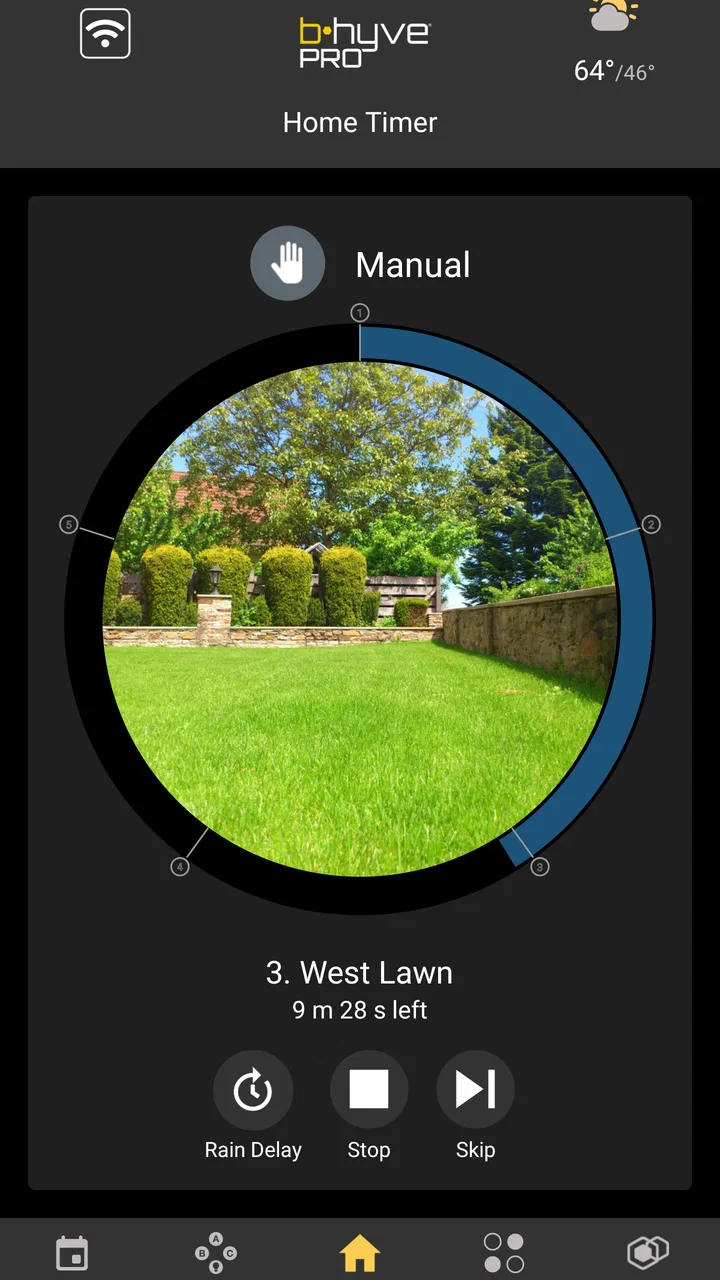
b-hyve Pro is a smart irrigation management app designed to control compatible Orbit b-hyve watering devices from a mobile phone. After connecting a supported controller, users can create watering schedules, start or stop zones, check program status, and make adjustments remotely. The app is especially useful for managing lawns and gardens without having to operate the irrigation controller manually.
02Does b-hyve Pro work with every irrigation controller or sprinkler system?
No. b-hyve Pro is intended for compatible Orbit b-hyve products, such as supported smart hose timers, indoor or outdoor controllers, and certain irrigation accessories. Before downloading, check the exact model and regional compatibility information because features can differ between devices. A compatible controller, an appropriate Wi-Fi connection, and a supported smartphone are generally required for remote management.
03Can b-hyve Pro automatically adjust watering based on the weather?
Compatible b-hyve systems can use weather-related information and smart watering features to help modify irrigation schedules. Depending on the controller and configuration, the system may account for conditions such as rain, temperature, or forecasted weather to reduce unnecessary watering. These adjustments are not a substitute for checking your garden, local restrictions, and device settings, since results depend on location and connectivity.
04Is an internet connection required to use b-hyve Pro?
An internet connection is normally required for initial setup, account access, remote control, weather-based features, and communication between the app and a connected smart controller. If the phone or controller loses connectivity, previously saved schedules may continue operating locally, but remote changes and status updates may be delayed. The exact offline behavior depends on the specific b-hyve device and its connection type.
05Is b-hyve Pro free, and are there any additional costs?
The b-hyve Pro app is generally available to download without a separate purchase, but using it effectively requires compatible Orbit b-hyve hardware. The controller, timer, hub, or other irrigation equipment must usually be purchased separately, and some advanced services or features may vary by product, region, or account configuration. Review the current store listing and product documentation for the latest pricing and requirements.
Pros
- Remote sprinkler control from anywhere with an internet connection.
- Weather-based scheduling helps reduce unnecessary watering.
- Supports multiple zones with flexible watering programs.
- Push notifications can alert you about watering activity or problems.
- Works with compatible smart timers and moisture sensors.
Cons
- Requires compatible b-hyve hardware to provide its full functionality.
- Some advanced features may require a subscription or extra devices.
- Initial setup can be confusing for users with complex irrigation systems.
- Performance depends on reliable Wi-Fi and internet connectivity.
- Occasional syncing or notification delays may affect remote control.

b-hyve Pro
Gallery